


Peoples
Choice
- No minimum balance requirements
- No monthly service fee requirements
- Unlimited check writing
- No check processing fee
- Only $25.00 minimum to open
- Free E-Statements
- Free Debit Card (some restrictions may apply)
- Ask about Peoples Student Checking
Peoples
Interest
- Daily minimum balance requirement of $2,500 to avoid an $11.00 monthly service fee
- Write 30 checks free per cycle (over 30 pay $0.20 per check)
- $2,500 minimum deposit to open
- Free E-Statements
- Free Debit Card (some restrictions may apply)
- Earn Tiered Interest
Peoples
Special
- No minimum balance requirements
- No monthly service fee requirements
- Unlimited check writing
- No check processing fee
- Only $25.00 minimum to open
- Free Electronic or Paper Statement
- Free Debit Card (some restrictions may apply)
- Must be 65 years or over
Peoples Pathway
- No minimum balance requirements
- Monthly service fee of $12.00
- Free E-Statements
- No checks
- After one full year of positive financial growth, you can request move to another checking account
- Free Debit Card (some restrictions may apply)
| Checking Account Type |
Minimum Deposit to Open |
Monthly Service Fee or Balance Requirements |
Statement Type |
Check Processing Fee |
Unlimited Check Writing |
Interest Earning |
Peoples Choice |
$ 25.00 | $0 | Electronic Statements | $ 0 | Yes | No |
Peoples Choice Student |
$ 25.00 | $ 0 | Electronic Statements | $ 0 | Yes | No |
Peoples Interest |
$2,500 | $11.00 if daily balance falls below $2,500 | Electronic Statements | $ .20 per check over 30 per cycle | No | Yes |
Peoples Pathway |
$ 25.00 | $12.00 | Electronic Statements | No checks available for this account | No | No |
Peoples Special |
$ 25.00 | $ 0 | Electronic or Free Paper Statement | $ 0 | Yes | No |
Paper Statements are available on all account types for a $6.00 fee.
Debit Card
Access your account anytime, anywhere with your PBC Debit Card.
- Make purchases – no need to carry cash or your checkbook
- Get cash at ATMs
- Security protection built-in with chip technology
Your debit card is not a credit card. Your purchases are deducted directly from your checking account. You can track your balance easily with ONLINE BANKING.
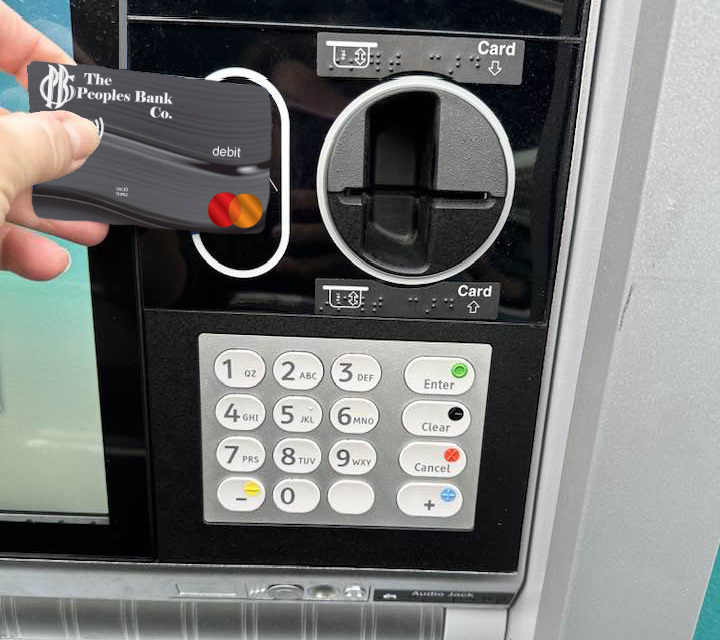
Safer and Easier than carrying cash!
Mobile Wallet
- Shop securely with a tap of your mobile phone
- No need to carry your purse or wallet when you have your card loaded in your Mobile Wallet
Manage My Card
- Fraud Protection
- Control Spending
Set Purchase Limits, Location Limits and Merchant Limits, all within your Mobile Banking App.
Purchase Limits
Location Limits
Merchant Limits
Check Order & Pricing
-
Core Pack $25.00 - $30.50
- 150 Singles / 125 Duplicates - Available in all designs - Includes register, Deposit tickets, Vinyl checkbook cover, Choice of Monogram/accent, Rotating shadow print
-
50 Pack $15.85 - $18.40
- 50 Singles / 50 Duplicates - Available in all designs - Includes register, Deposit tickets, Vinyl checkbook cover, Choice of monogram/accent, Rotating shadow print
-
Business Checks
Please contact your local PBC Branch or call us 1-866-PBC-BANK for pricing
Frequently asked questions
How do I open a checking account?
- First gather a few documents and information.
- Government issued Photo ID, like your driver's license, state ID, or passport (with social security card if using a foreign passport)
- Social Security Number or Taxpayer Identification Number
- Date of birth
- Physical address, phone number and email
- Opening deposit - depending on the account type you will need to fund your new account
- Once you have gathered the above items, you can visit our Personal Checking Account page on our website at https://pbc.bank/personal/personal-checking/
- Select your account type based on your banking needs.
- Complete the online account opening or you can visit one of our seven local branches.
Are there minimum balance requirements for a checking account?
There are no minimum balance requirements on the Peoples Choice, Peoples Special, or Peoples Pathway accounts. Peoples Interest Checking has a minimum balance of $2,500 to avoid a monthly service charge.
Can I have multiple checking accounts?
Yes. You can have multiple checking accounts. There are no restrictions on how many checking accounts you can open, whether at the same bank or across different financial institutions.
Having more than one checking account is a common strategy to keep finances organized.
How can I avoid service fees on my PBC checking account?
Depending on which checking account you choose, the fees are listed on our Personal Checking Account website page at https://pbc.bank/personal/personal-checking/.
To avoid overdraft and non-sufficient funds or NSF fees when using your debit card, you can opt out of optional overdraft coverage so card transactions decline instead of incurring fees. To minimize overdraft fees on checks or automatic withdraws link a savings account for a low-cost transfer protection. Another option is to enable mobile banking balance alerts to notify you when funds drop below a threshold you can set.
To avoid Out-of-Network ATM fees, use a PBC ATM whenever possible to withdraw cash or select the cash-back option at the grocery store or other retail checkouts.
To avoid a Paper Statement fee, sign up for e-Statements on your accounts. E-statements are safer and they are free.
What mobile banking features are available for my checking account?
If you have a PBC account, you can sign up for Online and Mobile Banking. The username and password are the same for both Online and Mobile Banking.
For Online Banking visit our website at https://pbc.bank/ click on the LOGIN box in the upper right corner and choose ENROLL NOW.
To sign up for Mobile Banking download the Peoples Bank Co Mobile Banking App from your chosen app store. Search for Peoples Bank Co.
How can I transfer money between accounts?
You can transfer money between accounts in your PBC Mobile Banking App or by logging into your Online Banking through https://pbc.bank/
You can also transfer money from accounts at other financial institutions using your PBC Online Banking or PBC Mobile App.
- Choose TRASFER & PAYMENTS on your PBC Mobile Banking App in the bottom navigation menu.
- Choose EXTERNAL TRANSFER - you may be asked to put in your password at this step if you have biometric technology set up for sign in.
- Complete the screens to transfer your money.
Can I pay my bills on my Online or Mobile Banking App?
Yes. You can select BILL PAYMENT in the top navigation menu in your Online Banking
Or selecting TRANSFER & PAYMENTS on your PBC Mobile App and select PAY BILLS under PAYMENTS.
Can I set up automatic payments?
Yes, You can set automatic payments in the BILL PAYMENT on either your Online Banking or PBC Mobile Banking App.
Do I get a debit card when I open a checking account?
Any PBC checking account is eligible for a debit card.
Some restrictions may apply to receiving a debit card.
How does a debit card work?
Our debit card is accepted anywhere Mastercard is accepted. It is swiped like a credit card, but the funds are withdrawn from your checking account. Unlike a credit card, which acts as a short-term loan from a bank, a debit card uses your own checking account funds.
How do I report a lost or stolen PBC debit card?
Mobile Banking customers can manage their debit card with their PBC Mobile Banking app. You can set controls and alerts like location, merchant type, and transaction limits. As well as turning your card on and off.
- Open the PBC mobile banking app
- Click on Cards in the bottom navigation
- Turn your card OFF by sliding the button under your card to OFF
- Select REPORT LOST OR STOLEN and call the number given
Customers who do not have mobile banking - Please contact The Peoples Bank Co. immediately so that the card's status can be changed to lost or stolen. During normal business hours, please call 419-678-2385 or toll free 1-866-722-2265. After normal business hours, please call 1-800-472-3272.